
 These resources are co-authored with our education & action partner at



Cellular Optimization
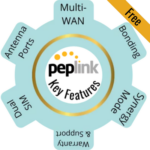
Peplink routers offer a range of features to optimize cellular data performance.
This article provides an overview of using external antennas, boosters, cellular band locking, and combining multiple connections with bonding/load balancing.
We have deep dives on all of these topics, linked in each section - this guide is more of a high-level overview of how each can play a role in optimizing your cellular data performance on your Peplink router.
For more tips on cellular data performance optimizations, check out our full guide at:
This Resource Provided by MMH & MIRC
This Peplink resource article was created in partnership with MobileMustHave.com, and parts may be offered as a free public resource with additional in-depth content available exclusively for our premium members.
The Mobile Internet Resource Center is proud to be partnered with MobileMustHave.com offering the education, news and guidance on mobile Internet options for RVers and boaters. Here at MIRC, we don't accept advertising, sponsorships and nor do we sell stuff.
Please consider becoming a member to go deeper with our content. Including Peplink discounts, webinars and advanced technical support provided by MobileMustHave.com.

MobileMustHave.com offers their Insider memberships, which include access to Mobile Internet Resource Center. You can also join MIRC directly for a lower cost if a MMH purchase is not in your future. You'll still get vendor discounts & Peplink tech support.
Consider Becoming a Member
If mobile internet is an important part of your lifestyle, a MobileMustHave membership (which includes membership to this website) can help keep you connected with these exclusive benefits:
- gear and data plan discounts
- member exclusive deals
- advanced replacement
- upgraded shipping
- in-depth exclusive content
- interactive guidance & community
- alerts & insider tips
- Peplink technical support
Peplink Cellular Data Performance Webinar Archive
On October 20, 2022, Cherie of the Mobile Internet Resource Center and Erik of MobileMustHave.com teamed up for our monthly member-exclusive webinar. Here is the video archive:
Below is a summary of the topics presented in the webinar, plus updates since the webinar was recorded due to firmware and feature changes.
Firmware Updates
Before making optimization changes, always confirm that the router is on the most current stable firmware.
For routers with cellular modems, also make sure the modem firmware is up to date. This is especially true for new devices with newer modems, as updates can greatly affect overall performance.
Firmware 8.6.0 was released on July 29, 2026. It is not available for every older Peplink router - details are in our story, or you can check your exact model and hardware revision on Peplink's firmware download page.
Important upgrade step: Most models must first be upgraded to firmware 8.5.4 before installing 8.6.0 through the router's local web interface.
External Antennas for Cellular Data Performance on a Peplink
One of the more important and easy-to-use tools to enhance cellular data performance is connecting external antennas to a Peplink router.
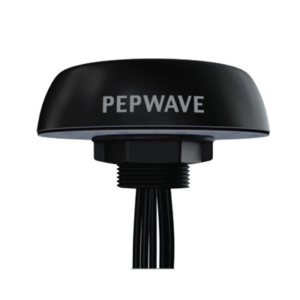
All Peplink routers come with screw-in paddle-type antennas. One is included for each antenna port, which attaches using standard SMA connectors. These paddle antennas are well-optimized and may be all you need in many signal situations - especially if your RV or boat does not contain lots of signal-blocking metal.
But when you have a weak signal, have your router inside a metal RV or boat, have obstacles around that might block the signal, or when the nearest tower is overloaded, it may be helpful to use roof- or pole-mounted antennas instead to improve your performance.
Options include using an antenna mounted above local clutter, switching to a higher-gain antenna, getting an antenna outside of signal-interfering metal, or even using a directional antenna to reach a specific faraway tower.
Cellular antennas can be directional or omnidirectional and have several form factors: monopoles, panels, directional antennas, and domes. When using them in your internet setup, these can be roof-mounted, pole-mounted, or even hung in a window.
Generally, you want to match the antenna capabilities to the modem - using a 4x4 "5G Ready" antenna for 5G devices, for example.
Firmware 8.3 added "Two Antenna Mode" on supported Peplink cellular modules, allowing some 4x4 MIMO-capable routers to operate with only two external antennas. Support is module-specific, not universal across all models. In particular, many 5GN/X62-based models do not officially support Two Antenna Mode. However, using only ports A and D can be a workaround, but it can disable some LTE and 5G bands.
However, it's always best to use 4x4 MIMO antennas, especially for mid-band 5G and carrier aggregation.
There are trade-offs in cost, storage, setup, and mounting to consider when going beyond the included paddle antennas.
For more information on how to select antennas, check our guide:
Selecting Mobile Cellular Antennas
Cellular Boosters for Peplink Data Performance
A cellular booster works by amplifying a weak cellular signal and rebroadcasting that signal locally to your cellular devices.
While this sounds very similar to how a cellular antenna works, in practice, cellular boosters are not as useful for optimizing cellular data performance.
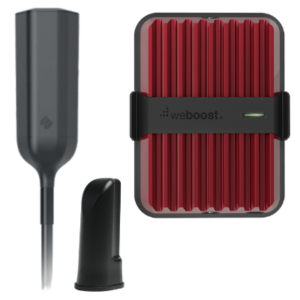
Some of the drawbacks include:
- When a booster amplifies a signal, it is also amplifying noise.
- They can not tap into the power of MIMO - or multiple in and multiple out, which is an essential technology for optimizing data performance. They receive and transmit only one signal.
- Boosters only work for a small number of frequencies allowed by the FCC and do nothing for the many other frequencies used in cellular connections.
Despite these downsides, boosters may outperform an external antenna setup in niche situations and may be worth having in your arsenal. The most relevant use case is when you are very far from a tower or need more upload performance.
To use a cellular booster effectively with a Peplink router, we recommend un-attaching any external antennas, re-attaching the included screw-in paddle antennas, and then placing the booster's internal antenna very near the router's antennas.
For more information about how to select boosters, how to use them, etc., check out our guide:
Mobile Cellular Boosters for Data Internet Access in RVs & Boats
Peplink Cellular Band Selection
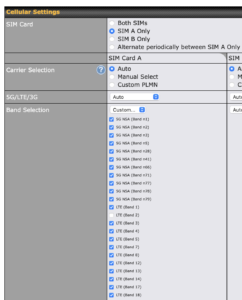
Cellular uses various wireless frequencies, and the best ones to use can change by location or even by time of day. By default, a cellular modem may not always choose the best-performing bands.
A unique feature of Peplink routers is the ability to override the default negotiation between the modem and the tower over which frequency bands your connection is assigned to, allowing you to manually choose which bands to use.
Sometimes picking specific bands (or preventing the use of others) can optimize your performance, but it can be quite labor-intensive to figure out the best current combination.
But when you have an important meeting or online event, and you've tried your other options (antennas or a booster), you may find this feature very handy for improving your cellular data performance.
One tip: if you use band selection, don't forget to turn it off before you leave! Arriving at your next destination with your router locked to specific frequencies is likely to be frustrating and not helpful.
Firmware 8.6 adds control over 5G Standalone carrier aggregation on routers with supported 5GK or 5GN cellular modems. Carrier aggregation allows a modem to combine compatible cellular bands for additional capacity and potentially better performance. This feature is modem- and network-dependent, and most users should leave the default setting in place unless troubleshooting a specific connection.
Firmware 8.6 also adds support for installing newer modem firmware on supported 5GN cellular modules, including updates intended to improve compatibility with 5G Standalone networks. Router firmware and cellular modem firmware are separate, so check both when troubleshooting cellular performance.
We have an in-depth guide going over this feature, including three different approaches to take when selecting frequency bands:
Peplink Cellular Band Selection
We also have a full member guide to understanding cellular frequencies:
Understanding Cellular Frequencies
Multiple Internet Sources: Bonding & Load Balancing
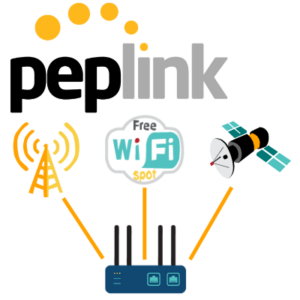
Redundancy is something we preach here at the Mobile Internet Resource Center, as each location can have its own challenges in determining what works best. And sometimes, it's a combination of multiple connection options that can do the trick - different cellular plans/carriers, satellite, etc.
Peplink routers are designed for bringing together multiple internet options (also called multi-WAN). Some routers have more than one cellular modem, Ethernet WAN ports, USB tethering ports, Wi-Fi as WAN, and/or Synergy mode to bridge multiple routers together, all of which allow for more than a single WAN connection.
For example, the Max BR2 Pro supports at least seven different sources: two cellular modems, 2 Ethernet WAN ports (plus one or more vWAN ports), USB tethering, and two Wi-Fi antenna frequencies to connect to two external Wi-Fi sources (Wi-Fi as WAN).
This could be expanded further by using another Peplink router in Synergy mode and combining its WAN sources as well.
Peplink's firmware offers many options for combining multiple connections to deliver the best reliability.
Some key firmware options include bonding multiple connections with SpeedFusion technology, balancing traffic across multiple connections, failing over when one connection goes down, and smoothing traffic from multiple WAN sources.
Firmware 8.6 adds SpeedFusion Boost on supported routers. This feature is designed to improve application performance over a SpeedFusion connection when using Starlink, 5G, and other suitable internet sources. It does not create additional bandwidth by itself, and the benefit will vary depending on the connections and application being used.
Firmware 8.6 also adds OneWeb integration and more Starlink status information in WAN Details, making troubleshooting easier.
Each approach has its pros and cons, and configuration, which are covered in these guides:
Peplink SpeedFusion Connect Protect - Bonding
Peplink & Multi-WAN: Using Multiple Internet Sources
Combining Internet Connections: Bonding, Load Balancing & Auto Failover
How to Know if Your Optimizations Are Working
When tweaking your cellular data performance, it's useful to know if your efforts are making a difference.
We have a guide to specifically help you do this. Our Testing guide covers key concepts associated with signal strength, and how to know if your signal-enhancing efforts are working:
Testing & Understanding Your Cellular Internet Performance
View our Peplink product line overview and articles - co-authored with our education & action partner at MobileMustHave (who offers advanced support, guidance and discounts to our members):








Explore the Resource Center

Have Questions?
Join our 'Library Desk':
Internet for RVers & Cruisers Facebook Group
We cross post news articles and guides, and can help point you in the right direction to our content here on the resource center.
It is with gratitude to our premium members that we're able to offer our free content - and for that, they also have access to our member Q&A areas for more in-depth guidance.
Become a Member
 The MIA is our premium membership - designed for those who consider mobile internet an important part of their lifestyle.
In thanks for making content like this possible, we offer a bunch of additional perks. From interactive guidance, in-depth member exclusive content, discounts, alerts, classroom and ability to book private advising sessions.
Stay In the Know
We're constantly tracking the industry and analyzing new developments for mobile travelers. If you'd like to receive updates, we offer several ways:
- Subscribe to our free monthly newsletter
- Subscribe to our News Stories RSS Feed
- Subscribe to our YouTube Channel
- Follow our Facebook Page





 Mobile Internet Resource Center was founded by Chris & Cherie of