 These resources are co-authored with our education & action partner at



What is vWan?
Virtual WAN ports allow you to assign any spare Ethernet LAN port on your router to be an additional Ethernet WAN port - it is often abbreviated as Peplink vWAN.
A WAN (wide area network) port on a router is what is used to connect to external internet sources - such as Starlink, cellular devices with Ethernet out, or wired internet. A LAN (local area network) is what is used to connect devices - such as laptops, TVs, tablets, smartphones - to your router to access the internet.
Many routers have designated WAN and LAN Ethernet ports, but Peplink's firmware (version 8.3 and later) can assign a LAN Ethernet port for WAN use.
This feature is a great way to get an additional wired Ethernet port for adding another Ethernet WAN connection. While this sounds like a standard switchable WAN/LAN port, there are some important differences in how vWAN works.
A LAN/WAN switchable Ethernet port is a physical port that can be assigned to act as either a local network port or an internet/WAN port. A vWAN does something similar in software, creating an extra WAN connection, which is useful when multiple internet sources need to share the same Ethernet cable or switch. For simple setups, a real switchable WAN port is usually easier; vWAN is more flexible but requires more network configuration.
vWAN was introduced in Peplink firmware 8.3, and one vWAN port activation is included for free with an active PrimeCare subscription.
And if you have a managed vLAN-capable switch on your LAN (or local WAN) - you can instead use one of the remote ports on the switch as an additional Ethernet WAN.
Read on for further details on using this feature.
This Resource Provided by MMH & MIRC
This Peplink resource article was created in partnership with MobileMustHave.com, and parts may be offered as a free public resource with additional in-depth content available exclusively for our premium members.
The Mobile Internet Resource Center is proud to be partnered with MobileMustHave.com offering the education, news and guidance on mobile Internet options for RVers and boaters. Here at MIRC, we don't accept advertising, sponsorships and nor do we sell stuff.
Please consider becoming a member to go deeper with our content. Including Peplink discounts, webinars and advanced technical support provided by MobileMustHave.com.

MobileMustHave.com offers their Insider memberships, which include access to Mobile Internet Resource Center. You can also join MIRC directly for a lower cost if a MMH purchase is not in your future. You'll still get vendor discounts & Peplink tech support.
Consider Becoming a Member
If mobile internet is an important part of your lifestyle, a MobileMustHave membership (which includes membership to this website) can help keep you connected with these exclusive benefits:
- gear and data plan discounts
- member exclusive deals
- advanced replacement
- upgraded shipping
- in-depth exclusive content
- interactive guidance & community
- alerts & insider tips
- Peplink technical support

Member Exclusive Content Below
We hope you have found the above content useful - it's a free preview of the sort of content we create for our premium members.
If you're one of our members, please do log in to continue with this resource article. The further topics we explore include:
Peplink vWAN Webinar Archive
Peplink vWAN on VLAN Explained
Peplink vWAN Device Compatibility & Cost
Configuring vWAN
Managed Switches for Remote vWAN
Tips and Tricks
Webinar Archive
Virtual WAN (vWAN) was introduced to most Peplink routers in Peplink firmware 8.3 and was the topic of our March 2023 Peplink webinar, co-hosted with MobileMustHave. Here is the archive:
Virtual WAN on VLAN (vWAN) Explained
A virtual Local Area Network (VLAN) allows multiple LANs to coexist over the same Ethernet cabling.
This is a common feature supported by many prosumer and business-grade Ethernet switches, and Peplink routers have long been able to use VLANs to manage how traffic is routed. For example, you can set up multiple VLANs to isolate guests or untrusted home automation devices.
We covered setting up VLAN's in this Peplink Resource Center article and recorded webinar:
Peplink firmware 8.3 and later includes a feature called Virtual WAN on VLAN (aka vWAN) that lets you use VLAN technology to add an additional WAN port to your router. Later firmware versions have added some additional features and bug fixes, so we recommend updating to the most current firmware your router supports to make the best use of vWAN.
These additional WAN Ethernet ports could be either repurposed LAN Ethernet ports on your router, or even distant LAN ports elsewhere on your network.
But why might you want this?
vWAN Usage Scenarios
Some Peplink routers have just a single WAN Ethernet port.
But what if you could use more?
Consider these possible Ethernet WAN sources:
- Starlink
- Cellular gateways or mobile hotspots
- Residential Cable or DSL Modem
Using vWAN - you can easily add a second, or even third (or perhaps more!) Ethernet WAN port.
And because you can use a managed switch located physically far away on your network, you do not even need to run multiple Ethernet wires back to your router.
On large boats and RVs, this flexibility can make it much easier to integrate Starlink in particular.
vWAN Device Compatibility & Cost
Here is the official list of compatible devices, according to Peplink:
- MAX: BR1 Mini HW3, BR1 ENT, BR1 Pro 5G, BR1 Pro HW7, BR2 Pro HW4, Transit (Except Mini), 700 HW3 or above, HD1 Dome/Dome Pro, HD2 Dome, HD2 HW5 or above, HD2 Mini, HD4
- B One: B One, B One 5g
- Balance: 20X, 30 LTE/Pro, One/Two, 210/310 HW4 or above, 310 5G/Fiber 5G, 310X, 305/380 or above
- UBR: Plus
- X Series: All
vWAN Free With PrimeCare

vWAN is a licensed feature, but many Peplink models with active PrimeCare include one Virtual WAN on VLAN while PrimeCare remains active.
If your router is still covered by the free first year of PrimeCare, or if you have paid to keep it active, you get vWAN for "free."
Additional vWANs, or a permanent vWAN after Care expires, may require a paid Virtual WAN Activation License. Beginning with Firmware 8.5.2, Peplink says the included Care-plan vWAN can stack with purchased vWAN licenses.
Permanent vWAN License
You can also buy a permanent vWAN license for the router. Note that this is not transferable to a different router.
Here is typical retail pricing for a permanent vWAN license:
| Activate 1x Virtual WAN on Prime Care device | LIC-VWAN | $200 |
| Activate 2x Virtual WAN on Prime Care device | LIC-2VWAN | $400 |
| Activate 3x Virtual WAN on Prime Care device | LIC-3VWAN | $600 |
When you unlock vWAN capability like this, it is for the life of the router; this is not an annual fee.
Most PrimeCare Peplink routers can add up to 3 vWAN ports, but some higher-end enterprise-grade Peplink routers can support many more.
Configuring Peplink vWAN
Setting up vWAN by repurposing an existing Ethernet LAN port is easy (note again, this feature requires firmware 8.3 or higher)
Here are the steps:
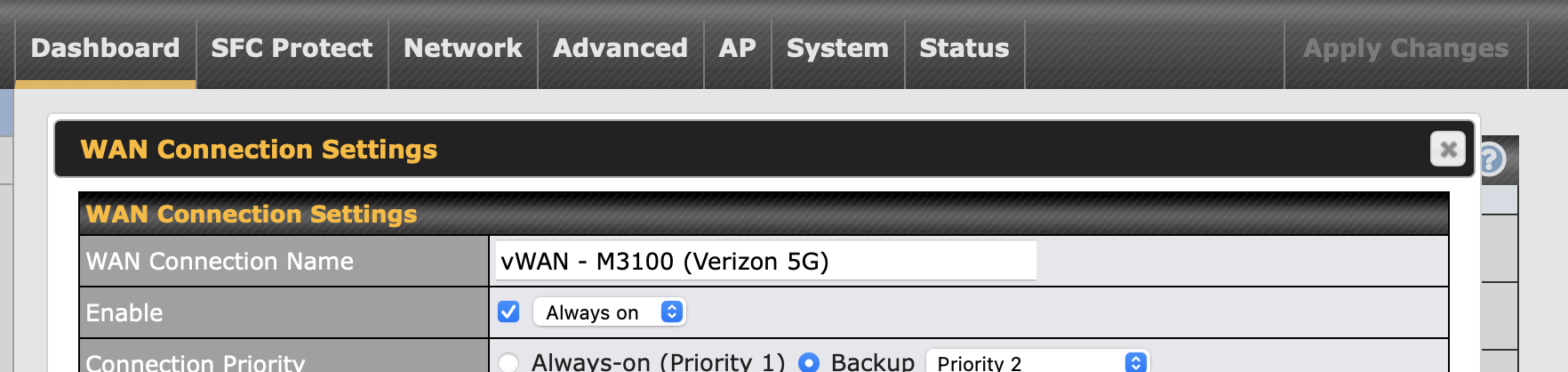
- Select the vWAN port from your Peplink dashboard by clicking on the port's name. The default name for the first vWAN port is "VLAN for WAN 1". If you do not see a vWAN port, you need to either make sure that your PrimeCare is current, or you have purchased a vWAN license.

- Turn on and label vWAN the vWAN port.
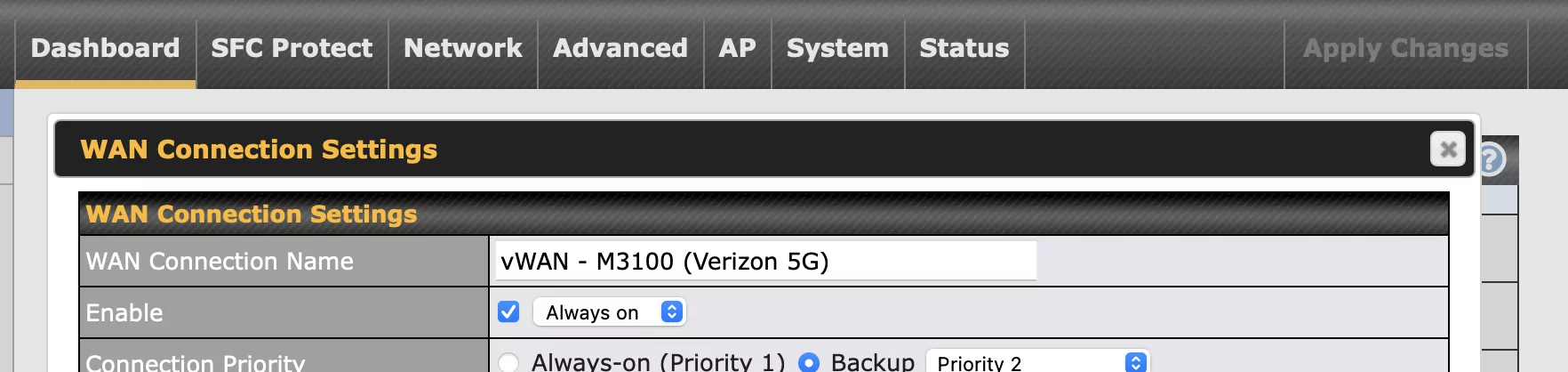
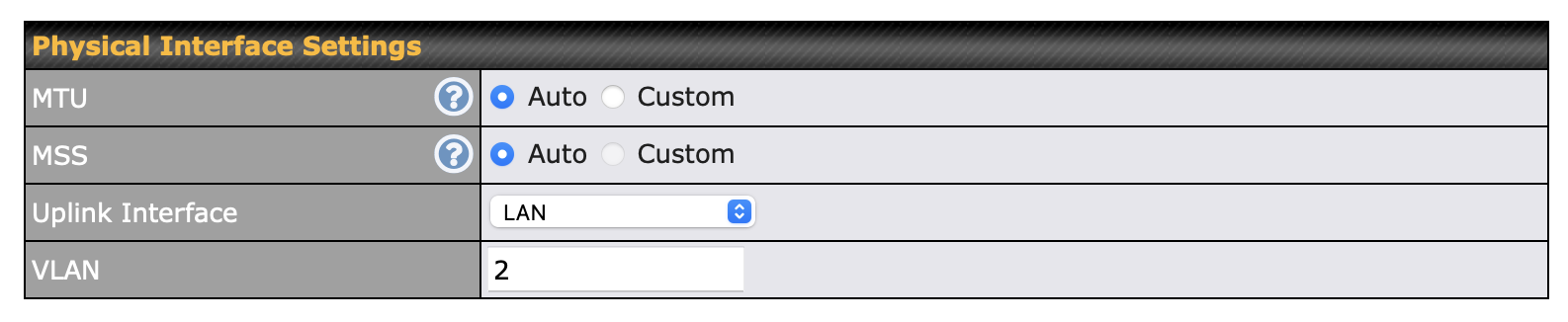
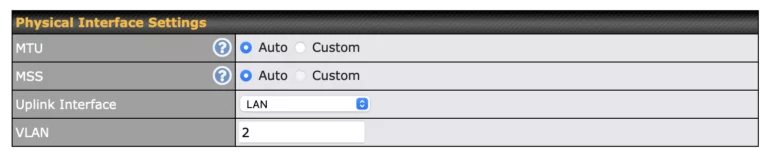
- Under physical interface settings, choose WAN or LAN as the uplink interface, depending on where you have the device you want to use connected. Most likely, you will be selecting "LAN". Then enter a VLAN number (it can be almost anything), and make a note of it.
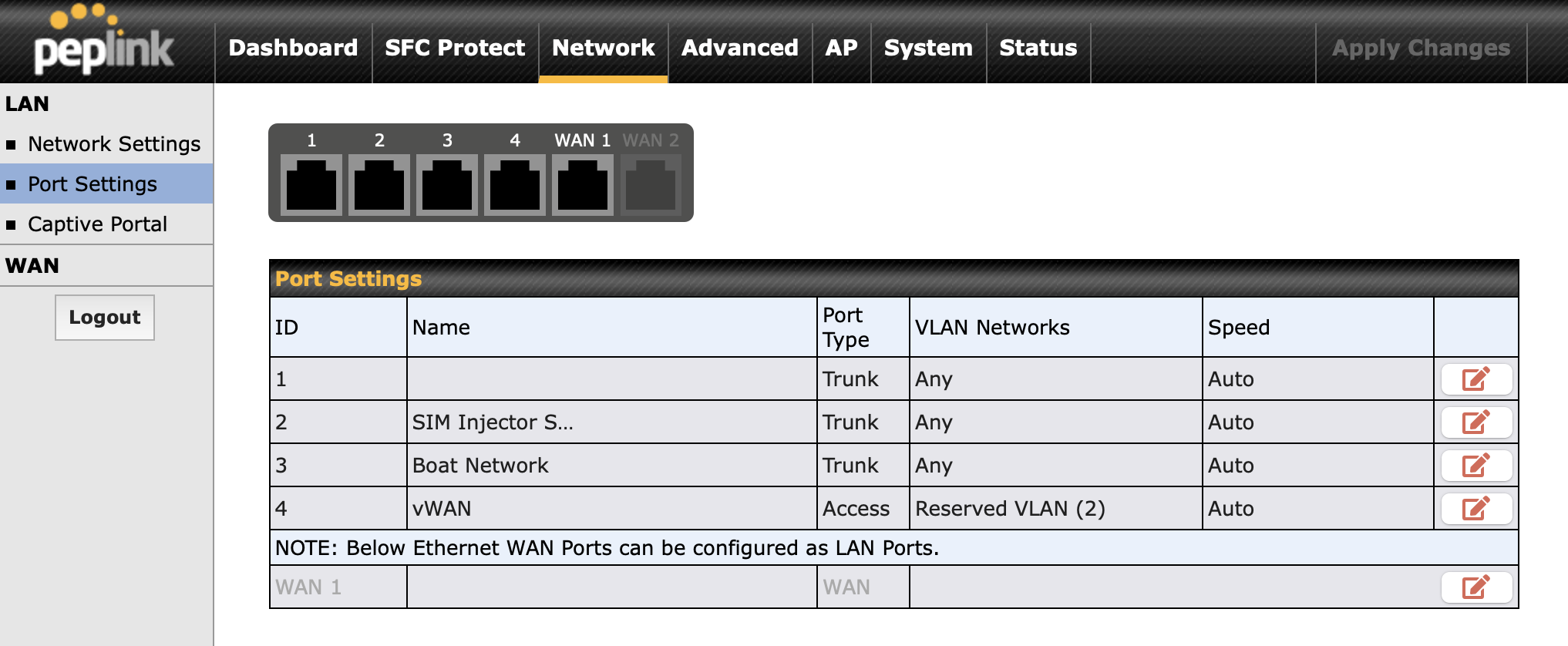
- Go to the network tab, and select port settings.
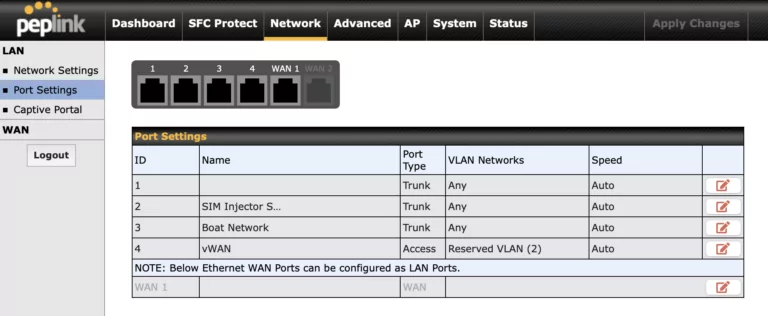
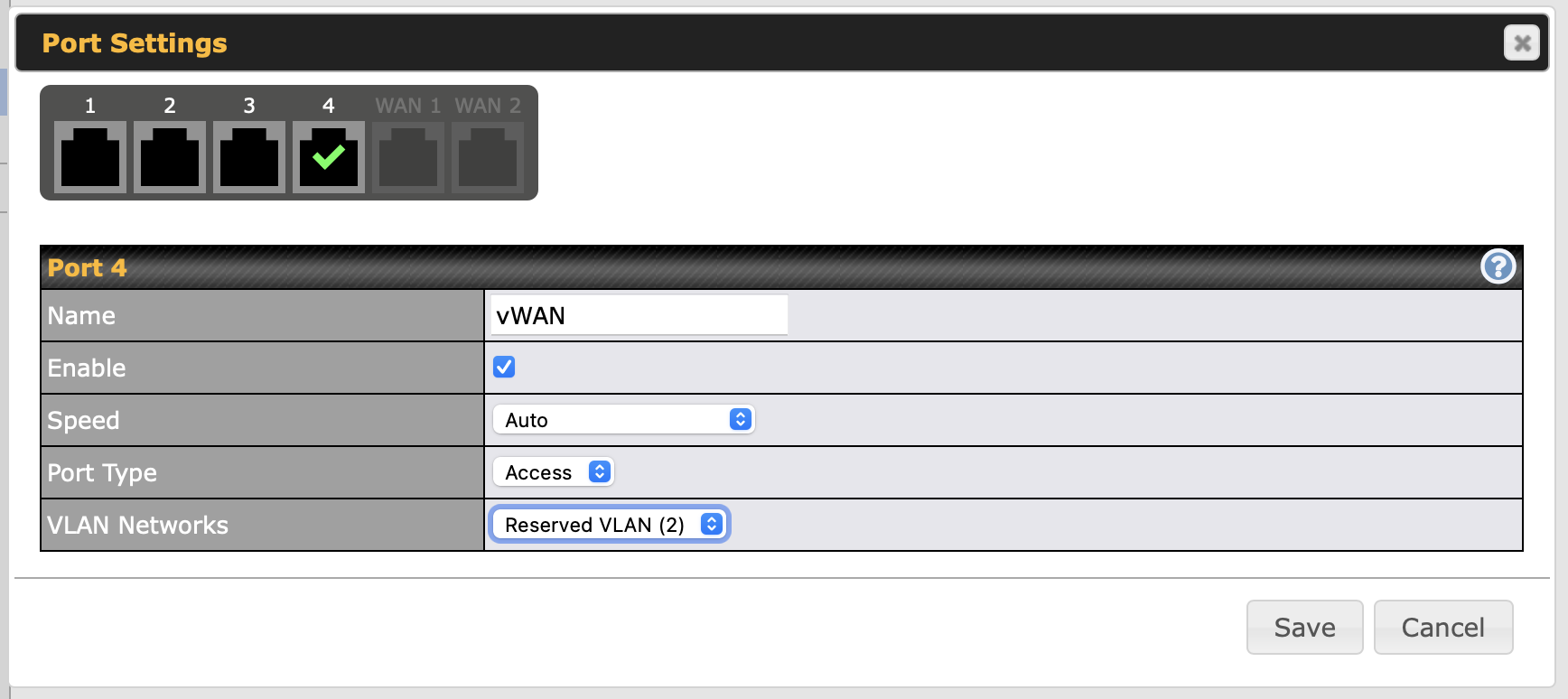
- Pick the Ethernet port you want to repurpose, and change the port type to “Access”. Under the VLAN network, select the VLAN number you entered above. It will show as an option in the pull-down labeled as “Reserved”. To help keep things straight, also give the port a name.
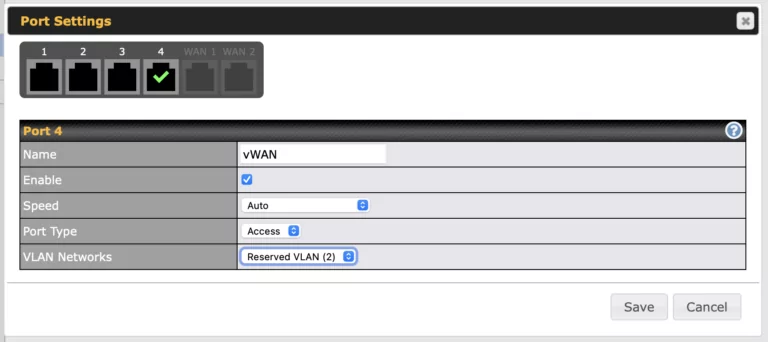
- Save and apply changes.
And now that LAN port is just another WAN port that you can manage on your Peplink router dashboard, and you can use it for SpeedFusion bonding, load balancing, and other advanced outbound policies as well.
Using A Managed Switch For Remote vWAN
One advantage of vWAN is that the WAN device does not need to be plugged directly into the Peplink router. With a managed switch, you can plug a remote WAN source, such as Starlink, a cable modem, or another router, into a switch port assigned to a dedicated VLAN, and then carry that VLAN back to the Peplink router.
One of the advantages of vWAN is that you aren't restricted to using LAN ports on the router itself; you can also use vWAN on a LAN port of a compatible managed switch that is connected to your router.
To do this, the port connected to the WAN device is usually configured as an access (untagged) port on the vWAN VLAN. The port connecting the switch back to the Peplink router is usually configured as a trunk (tagged) port that carries that VLAN. The Peplink router then treats that VLAN as a separate WAN connection.
This is useful when the WAN source is physically far from the router, or when you want LAN and WAN traffic to share the same Ethernet cable. A basic unmanaged switch usually does not support this, but many affordable smart-managed or business-class switches do.
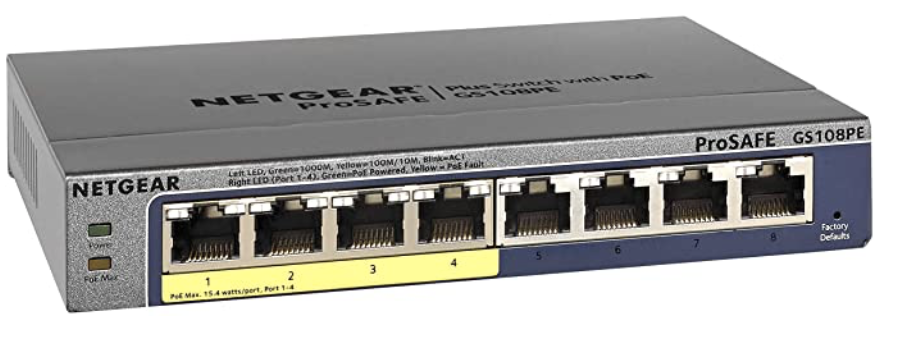
To use a port on a separate switch for vWAN, first follow steps #1 through #3 above.
Then using the control panel for your managed switch (every switch is different - check your manual) - set up the port you want to use in “Access” mode with the same VLAN number you defined in step #3 above.
A network switch in Access mode tags traffic on a particular port with a VLAN number, so the router knows to handle it differently.
In this case, it treats it just the same as if you had dedicated an Ethernet LAN port directly on the router to the vWAN task.
vWAN Tips
Here are a few additional tips:
- vWAN can be used with router ports or with a VLAN defined on a switch elsewhere in your network. This flexibility lets you use a port on a distant switch on your LAN that might be more conveniently positioned for a new Ethernet WAN source, such as Starlink or a DSL or cable modem.
- You can use the WAN or LAN ports on the router if they connect to a managed switch that can handle the necessary VLAN tagging, though using the LAN ports is more common.
- vWAN shares bandwidth with the Ethernet WAN or LAN port it is layered on, so if it is on your LAN, it can reduce LAN routing capacity.
Related Resources
Here are some related Peplink articles to explore:
View our Peplink product line overview and articles - co-authored with our education & action partner at MobileMustHave (who offers advanced support, guidance and discounts to our members):







Explore the Resource Center
Have Questions?
Join our 'Library Desk':
Internet for RVers & Cruisers Facebook Group
We cross post news articles and guides, and can help point you in the right direction to our content here on the resource center.
It is with gratitude to our premium members that we're able to offer our free content - and for that, they also have access to our member Q&A areas for more in-depth guidance.
Become a Member
 The MIA is our premium membership - designed for those who consider mobile internet an important part of their lifestyle.
In thanks for making content like this possible, we offer a bunch of additional perks. From interactive guidance, in-depth member exclusive content, discounts, alerts, classroom and ability to book private advising sessions.
Stay In the Know
We're constantly tracking the industry and analyzing new developments for mobile travelers. If you'd like to receive updates, we offer several ways:
- Subscribe to our free monthly newsletter
- Subscribe to our News Stories RSS Feed
- Subscribe to our YouTube Channel
- Follow our Facebook Page




 Mobile Internet Resource Center was founded by Chris & Cherie of