
Key Points:
- Wi-Fi 6 remains the recommended minimum for most mobile internet gear.
- Wi-Fi 7 is increasingly available, but many devices do not implement the full set of features enabled by the standard.
- Wi-Fi-as-WAN is increasingly less important as cellular and satellite options improve, and it remains mostly a 2.4 GHz and 5 GHz technology.
- The FCC router ban could slow the rollout of newer full-featured Wi-Fi 7 routers and hotspots in the United States.
Two years ago, we published a deep dive into Wi-Fi technology and how it fits into mobile internet setups for our audience of people who live, work, or travel in vans, boats or RVs.
Since then, the Wi-Fi landscape has continued to evolve.
Wi-Fi 7 has moved from an emerging standard to real-world products. 6 GHz support has become more common in some consumer gear. And newer hotspots, routers, phones, tablets, and laptops are starting to advertise support for the latest Wi-Fi features.
But for mobile users, the practical impact of these changes has been more modest than the marketing might suggest.
Most mobile internet setups are still built around cellular, satellite, and local Wi-Fi networks working together.
Faster Wi-Fi does not help much if the upstream connection is a weak cellular signal, a congested Starlink area, or overloaded marina/campground Wi-Fi.
In this update, we will focus on what has changed, what has not changed, and what RVers, boaters, and other mobile users should actually care about when evaluating Wi-Fi gear in 2026.
Table of Contents
Wi-Fi Industry Update Video
Wi-Fi Overview And Frequency Bands
Our Fundamentals of Wi-Fi Technology guide goes much deeper into Wi-Fi basics, but at a high level, "Wi-Fi" refers to a set of wireless local area networking standards and protocols created and controlled by the Wi-Fi Alliance. The Wi-Fi Alliance is an association that promotes Wi-Fi technology and works to ensure interoperability among devices as the standard continues to evolve.
 The simple idea behind Wi-Fi is that an access point creates a local network by broadcasting over pre-defined wireless channels - hosting a network that nearby compatible devices can connect to if they know the network's name and password.
Wi-Fi has become the dominant wireless technology for local area networking, and the term "Wi-Fi" is often synonymous with wireless internet access.
Since Wi-Fi is a wireless technology, it uses frequencies, and the three main spectrum bands that matter for Wi-Fi today are 2.4 GHz, 5 GHz, and 6 GHz.
Each band has different strengths and weaknesses, and understanding these differences is often more important than knowing which Wi-Fi generation a router supports.
2.4 GHz Wi-Fi
2.4 GHz is the oldest Wi-Fi band still in widespread use, and it is NOT the band to use for maximum performance.
This band is crowded, limited, and relatively slow compared to 5 GHz and 6 GHz. Only three non-overlapping 2.4 GHz Wi-Fi channels are available in the United States, and many other technologies, including Bluetooth devices, baby monitors, wireless cameras, and even microwave ovens, can create interference in this same general frequency range.
But 2.4 GHz is not obsolete.
The biggest advantage of 2.4 GHz is range. Lower-frequency signals generally travel farther and penetrate obstacles better than higher-frequency signals. This can make 2.4 GHz useful around a campsite, on a boat, or in a larger RV where range is more important than speed.
2.4 GHz also remains essential because a lot of older and budget gear still only supports this band. Many printers, cameras, smart plugs, thermostats, appliances, and other IoT devices are 2.4 GHz-only.
Because 2.4 GHz is needed for backwards compatibility - many users are better off keeping a dedicated 2.4 GHz Wi-Fi network available for legacy and IoT devices, even if most of their laptops, phones, and tablets primarily use 5 GHz.
2.4 GHz is also the most common band for many Wi-Fi-as-WAN setups, as discussed below.
5 GHz Wi-Fi
For most mobile internet setups, 5 GHz remains the most important and usable Wi-Fi band.
5 GHz provides a much better balance of speed, range, stability, and compatibility than either 2.4 GHz or 6 GHz. It is much faster and less congested than 2.4 GHz, but it generally has better range and better penetration than 6 GHz.
Most modern phones, laptops, tablets, streaming devices, and routers support 5 GHz, and many mobile routers and hotspots are optimized for 5 GHz as the primary performance band.
For many of our nomadic audience, 5 GHz is also the most useful band for Wi-Fi-as-WAN when an upstream 5 GHz Wi-Fi network is available. 2.4 GHz may reach farther, but 5 GHz usually provides substantially better speeds if the signal is strong enough.
This is one reason outdoor antennas, outdoor access points, or outdoor client devices can matter so much for Wi-Fi-as-WAN. Getting a better 5 GHz signal outside the RV or boat can make a much bigger difference than upgrading the internal router to a newer Wi-Fi generation.
6 GHz Wi-Fi
6 GHz is the newest Wi-Fi band, introduced with Wi-Fi 6E and carried forward into Wi-Fi 7.
On paper, 6 GHz is extremely exciting. It adds a huge amount of new spectrum, supports wider channels, and is far less congested than the older Wi-Fi bands. In dense indoor environments, 6 GHz can provide excellent performance for devices that support it.
But 6 GHz has not been transformative for most mobile internet users.
The biggest problem is range. 6 GHz has a shorter range than 5 GHz and is worse at penetrating obstacles such as RV walls, boat structures, foliage, other vehicles, buildings, and terrain.
6 GHz also has much more limited client support. Many phones, laptops, tablets, and routers still do not support 6 GHz. And even when a router supports 6 GHz, it may have important limitations, such as 6 GHz being available only when plugged in (and not operating on battery), or 6 GHz not working simultaneously with 5 GHz, or 6 GHz not being supported at all in certain operating modes.
Regulations are another issue.
FCC-imposed 6 GHz rules in the US remain more complicated than those for 2.4 GHz or 5 GHz, especially for outdoor and mobile use, which we go into more detail about below.
For now, 6 GHz is best thought of as a short-range high-performance LAN band. It can be useful in an RV or boat for compatible devices near the router, especially for local file transfers, backups, media servers, and other LAN-heavy uses. But it is not a replacement for 5 GHz.
Wi-Fi Standards Explained
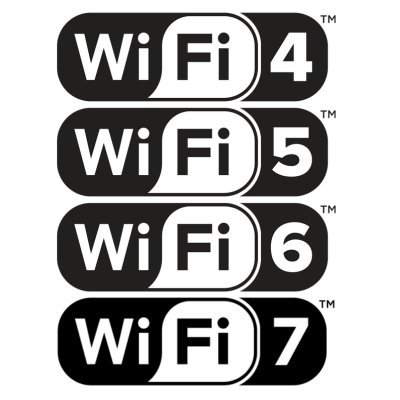
The Wi-Fi Alliance uses consumer-friendly names like Wi-Fi 5, Wi-Fi 6, and Wi-Fi 7 instead of the older technical IEEE 802.11 designations.
In general, the higher the number, the newer and more capable the technology. But Wi-Fi is backward compatible, and support for a newer standard does not mean every possible feature of that standard is included.
Here is where the market stands today:
- Wi-Fi 4: Older and low-end gear, especially 2.4 GHz-only IoT devices. Wi-Fi 4 is no longer appropriate for a primary router or access point, though it may still be found in basic smart devices.
- Wi-Fi 5: Still common in older mobile routers, hotspots, and lower-end devices. Wi-Fi 5 remains usable, but it is no longer ideal for new primary networking gear.
- Wi-Fi 6: The current practical mainstream standard for most mobile internet gear. Wi-Fi 6 is mature, widely supported, and remains our recommended minimum for most new routers and access points.
- Wi-Fi 6E: Wi-Fi 6E added 6 GHz support to Wi-Fi 6, but it was never as widely adopted in mobile internet gear as Wi-Fi 6. Many manufacturers are moving directly from Wi-Fi 6 to Wi-Fi 7.
- Wi-Fi 7: Increasingly common in phones, laptops, home routers, some hotspots, and limited prosumer gear. But Wi-Fi 7 support is inconsistent, and not all Wi-Fi 7 devices include the most important Wi-Fi 7 features.
Here's our Wi-Fi comparison chart, which includes preliminary info on what Wi-Fi 8 might bring:
For more on the basics of Wi-Fi technology, see our guide: Fundamentals of Wi-Fi Technology.
Wi-Fi 7 Is Here, But Not All Wi-Fi 7 Is Equal
Wi-Fi 7 was formally released in early 2024, shortly before our previous Industry Update. Two years later, it has become more mainstream but hasn't yet lived up to the initial hype and promises.
Wi-Fi 7 is now appearing in many flagship phones, laptops, tablets, home routers, mesh systems, some mobile hotspots, and a growing number of prosumer and enterprise networking devices.
But this does not mean Wi-Fi 7 has fully arrived for mobile users, or that all Wi-Fi 7 products are equal.
One of the most important things to understand is that "Wi-Fi 7" support on a piece of gear does not guarantee that it includes every feature of the Wi-Fi 7 specification.
Depending on the product, a Wi-Fi 7 router or hotspot may still lack:
- 6 GHz support
- 320 MHz channel support
- Simultaneous 5 GHz and 6 GHz operation
- MLO (Multi-Link Operation)
- High-end 4x4 radios
- Full Wi-Fi performance while running on battery
- Mature firmware support for all advertised features
This is especially true for mobile gear, where power draw, heat, antenna size, physical space, and battery life all constrain what manufacturers can realistically implement.
What Wi-Fi 7 Is Supposed To Bring
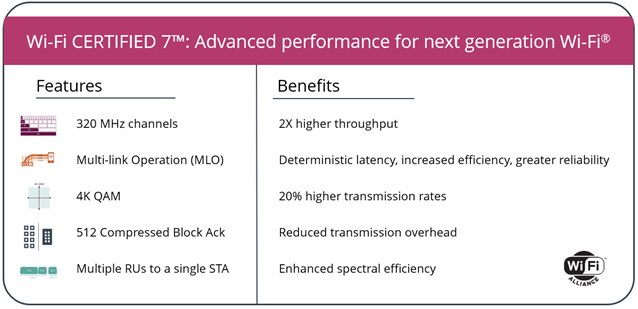
Wi-Fi 7 includes several important technical advancements over previous generations:
- 6 GHz support: When included, 6 GHz gives Wi-Fi 7 access to this fast and uncluttered chunk of spectrum.
- Wider channels: Wi-Fi 7 can support up to 320 MHz channels, double the maximum width available with Wi-Fi 6 and 6E. Wider channels mean higher peak speeds.
- Multi-Link Operation: MLO is designed to allow Wi-Fi 7 devices to use multiple bands or channels more intelligently. Ideally, it allows Wi-Fi to combine 2.4 GHz, 5 GHz, and 6 GHz for greater reliability and performance.
- Better channel utilization: Wi-Fi 7 can use available spectrum more efficiently and mitigate certain types of interference more effectively.
- Lower latency potential: Wi-Fi 7 is designed to improve responsiveness for applications like gaming, VR, video calls, and other tasks where low latency is important.
These are significant improvements on paper.
In ideal conditions, Wi-Fi 7 can deliver far more LAN performance than Wi-Fi 6.
But mobile internet users rarely operate under ideal conditions, and Wi-Fi 7 implementations vary widely by product.
Wi-Fi 7 Feature Implementation Varies Widely
Some of the newest mobile internet gear now advertises Wi-Fi 7, but the details of which parts of the specification a device supports matter a great deal.
Here are some examples of recent products we've covered:
- The Inseego MiFi PRO M4 and the Netgear Nighthawk M7 support Wi-Fi 7, but not the 6 GHz band or MLO.
- The Netgear Nighthawk M7 Pro supports 6 GHz, but like the previous Netgear M6 Pro, some of its highest-performance Wi-Fi features are tied to operating in plugged-in mode with the battery removed.
- The Peplink AP One Enterprise is Peplink's first (and currently only) Wi-Fi 7 product, but it is also an enterprise-focused product with features, power requirements, and pricing that will be overkill for most RV and boat installations.
- The GL.iNet Mudi 7 is one of the more interesting mobile examples because it brings Wi-Fi 7 and 6 GHz to a mobile hotspot.
- The Inseego FX4200 router is one of a handful of mobile routers that support Wi-Fi 7, but it only supports dual-band (no 6 GHz), 2x2 MIMO, and no MLO.
Most mobile routers still use Wi-Fi 6, but we expect to see more Wi-Fi 7 options come out over the rest of 2026 and into 2027. However, it's likely those routers will not support all the features that Wi-Fi 7 can offer.
What we've learned is that the Wi-Fi 7 logo should be treated as a starting point, and customers should not assume any device supports the entire specification.
When evaluating Wi-Fi 7 gear, look at the actual features or the details on a spec sheet (and read our articles and reviews of new gear).
Does it support 6 GHz? Does it support simultaneous 5 GHz and 6 GHz operation? Are the radios 2x2 or 4x4? Does it restrict certain features on battery? Does it support Wi-Fi-as-WAN? Does it support MLO?
Unfortunately, getting answers to all those questions can be difficult, and manufacturers may not disclose all the device's capabilities (or lack thereof).
MLO: Promising, But Not Ready For Prime Time
Multi-Link Operation, or MLO, is one of the signature features of Wi-Fi 7.
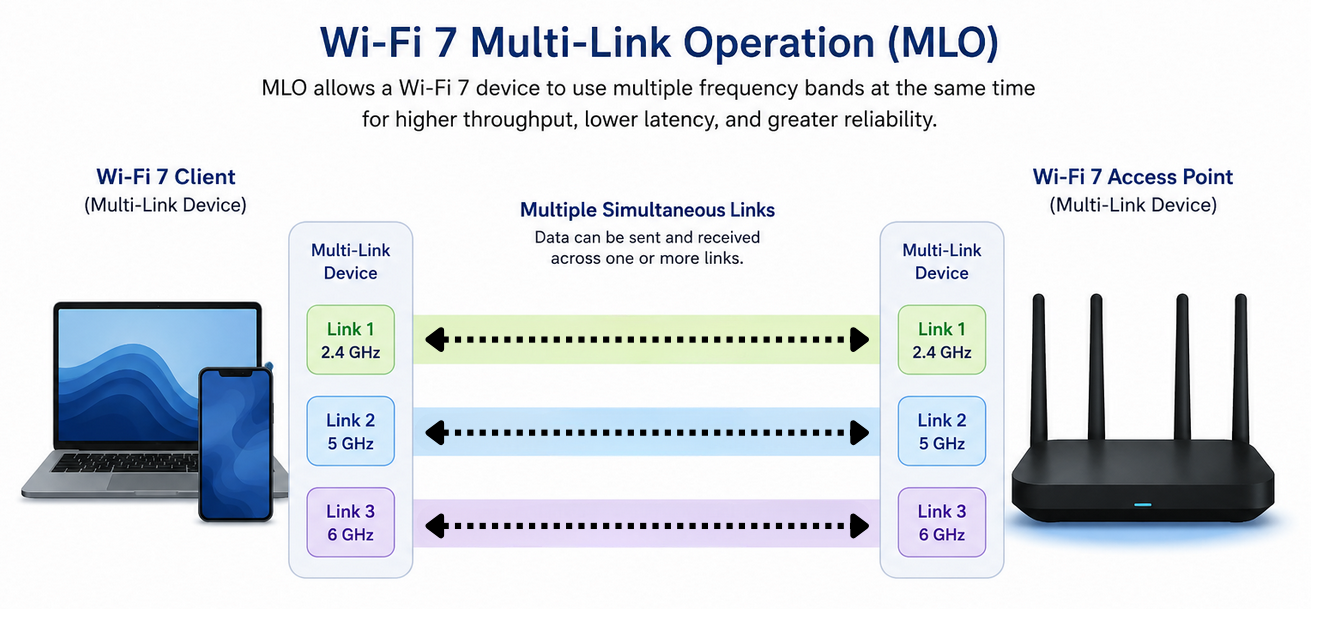
In theory, MLO should allow Wi-Fi 7 devices to use multiple Wi-Fi bands more intelligently. Instead of forcing a device to use only 2.4 GHz, 5 GHz, or 6 GHz at a time, MLO can allow multiple links to work together for higher throughput, lower latency, better reliability, or improved congestion management.
This resembles how carrier aggregation works in cellular networks, where cellular modems combine different bands to provide significant performance and reliability improvements.
But in practice, MLO in current real-world products has been underwhelming - either it is not supported at all, or poorly/incompletely supported.
Some Wi-Fi 7 routers (mostly those intended for consumer home networks) technically support MLO but do not implement the full version that many buyers expect based on marketing. Some products use more limited forms of MLO, and others require very specific client, firmware, and operating system support before anything useful happens.
In our own testing and in reports from other users, enabling MLO has sometimes resulted in reduced range, unstable behavior, or worse real-world performance than with traditional separated bands and SSIDs.
This is especially true in mixed environments where legacy Wi-Fi devices and Wi-Fi 7 devices share the same network. A network full of older printers, smart devices, cameras, streaming sticks, laptops, and phones is very different from a clean lab setup with only the newest Wi-Fi 7 gear.
Firmware updates will likely improve MLO over time, but for now, many users may be better served by separating bands into dedicated SSIDs:
- 2.4 GHz: IoT, printers, cameras, smart devices, and older WPA2-only devices.
- 5 GHz: General-purpose network for most phones, laptops, tablets, streaming devices, and work devices.
- 6 GHz: Short-range high-performance use for devices that support it.
This setup is not as flashy as automatic band aggregation, but it can be more predictable, reliable, and easier to troubleshoot.
Other Reasons Wi-Fi 7 May Be Held Back
Even when a device supports Wi-Fi 7, several practical limitations can prevent it from delivering a huge upgrade over Wi-Fi 6.
2x2 Radios
Like 2x2 versus 4x4 MIMO in cellular, a 2x2 Wi-Fi radio has fewer spatial streams to work with. This limits peak speeds, capacity, and signal robustness compared with 4x4 designs, even if both products technically support the same Wi-Fi generation.
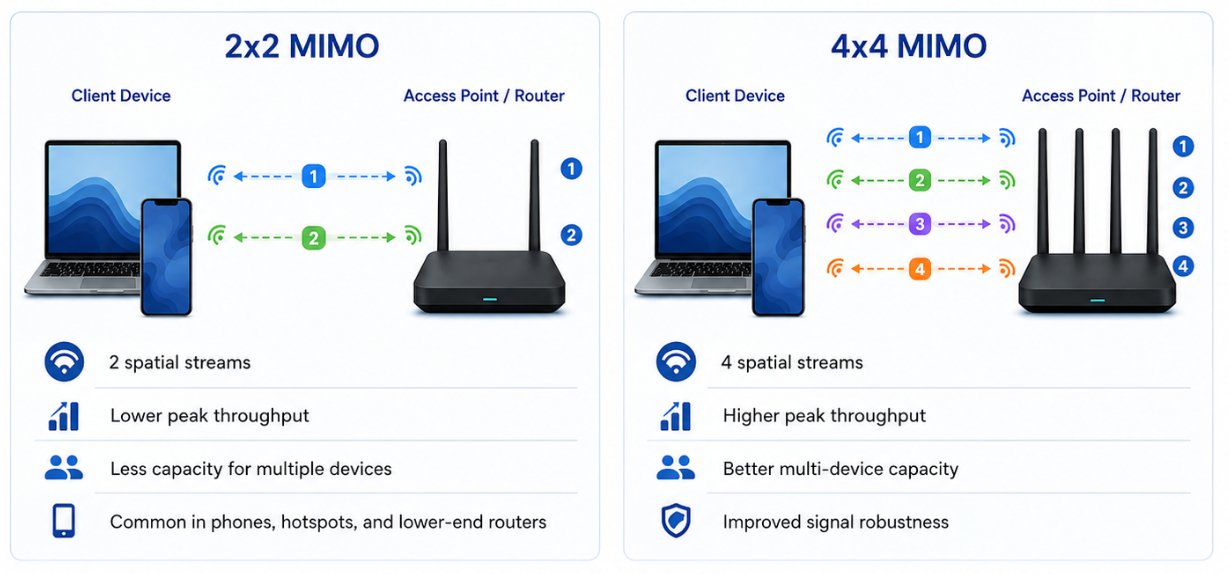
Many phones and laptops are 2x2 clients, so 2x2 isn't inherently bad. But a high-end access point with 4x4 radios can better serve multiple clients and deliver more total capacity than a lower-end 2x2 design.
Power and Thermal Limits
Power and thermal limits are especially important for battery-operated devices as well as mobile routers intended for harsh environments, such as many enterprise devices from Peplink and other companies.
A router or hotspot may reduce, disable, or restrict high-performance Wi-Fi features such as 6 GHz, wider channels, higher transmit power, or simultaneous radios when running on battery or when heat buildup becomes an issue.
This is one reason some hotspots only enable their best Wi-Fi performance when plugged in, or when operating in a special mode with the battery removed.
Software and Firmware Limitations
As with cellular modems, the hardware is only part of the story.
A device may have capable Wi-Fi hardware, but the firmware may not utilize or optimize every feature. Early Wi-Fi 7 products may require multiple firmware updates before their advanced features become stable or useful, as we experienced in our testing.
This is not unusual for newer networking standards, but it reinforces the need to evaluate real-world performance rather than assuming that a new standard automatically yields better results.
6 GHz: Why It Matters, And Why It Hasn’t Transformed Mobile Internet
The 6 GHz band remains one of the most important long-term Wi-Fi developments.
It adds a large amount of new spectrum, enables wider channels, and delivers excellent performance in dense indoor environments where many devices compete for Wi-Fi airtime.
For local networking, 6 GHz can be very useful. If you are moving large files to a local NAS, backing up photos and videos, streaming from a local media server, gaming on a local network, or using other high-bandwidth LAN applications, 6 GHz can be a meaningful upgrade when both the router and the client device support it.
But most mobile internet users are not limited by LAN speed. We are limited by the upstream Internet connection, whether that is cellular, Starlink, campground Wi-Fi, marina Wi-Fi, or some combination of sources.
For most mobile users, Wi-Fi 6 on 5 GHz is already faster than their typical Internet source.
Or it's fast enough not to make a meaningful difference in most use cases.
6 GHz also has several practical disadvantages:
- Shorter range than 5 GHz.
- Worse penetration through walls, vehicle shells, boat structures, foliage, and other obstacles.
- Limited support in many client devices.
- Higher power draw in some mobile devices.
- Regulatory restrictions on outdoor and mobile use.
- Implementation limits in some routers and hotspots.
Some Wi-Fi 7 gear omits 6 GHz entirely, and some gear that supports 6 GHz cannot use 5 GHz and 6 GHz simultaneously. This is a major limitation because 5 GHz remains the more important band for general use and Wi-Fi-as-WAN.
So it's usually a bad idea to sacrifice 5 GHz to use 6 GHz.
Regulatory Limitations
 Manufacturers are not wholly to blame for anemic support for 6 GHz, since a major problem is that, in the US, FCC regulations limit the use of the band for Wi-Fi.
Current 6 GHz Wi-Fi rules were designed primarily to protect existing users of the 6 GHz band, which means they are much more restrictive than those for 2.4 GHz or 5 GHz Wi-Fi.
Standard-power 6 GHz access points can be used indoors or outdoors, but they require an automated frequency coordination system to avoid impacting existing 6 GHz users, which is challenging and uncommon.
Low-power indoor 6 GHz access points are easier to deploy, but they are intended for indoor fixed use and generally cannot be weatherproof, use external antennas, or run on battery power. This is why, for example, the Netgear M6 and M7 Pro mobile hotspots disable 6 GHz unless the battery is removed.
It's also why routers supporting the 6 GHz frequency generally do not have external Wi-Fi antenna ports.
Very-low-power 6 GHz devices have easier restrictions, but must operate at much lower power levels, which greatly limit range.
Fortunately, regulators and industry recognize that the current rules are a problem, and the FCC is working on new rules that should make the band more useful for mobile, battery-powered, and outdoor devices.
But it will take a while for the new rules to be released and for manufacturers to incorporate them into devices, so expect that 6 GHz in the real world will be limited for a while to come.
Dual-Band Wi-Fi 7 vs Wi-Fi 6
Given current 6 GHz limitations and limited support for the full Wi-Fi 7 specification from manufacturers, one question is whether a dual-band Wi-Fi 7 router without 6 GHz, MLO, etc., is meaningfully better than a Wi-Fi 6 router.
The answer is: sometimes, but usually not by a huge amount.
A dual-band Wi-Fi 7 device without 6 GHz, without 320 MHz channels, and without mature MLO is usually an incremental upgrade over Wi-Fi 6, not a full generational leap.
There can still be advantages. Wi-Fi 7 can bring better channel utilization, newer chipsets, and lower-latency potential. And Wi-Fi 7 devices are often on newer platforms with faster processors, better Ethernet ports, and other components that are newer.
But the biggest Wi-Fi 7 speed gains usually depend on 6 GHz, wide channels, and robust MLO. Without those, a Wi-Fi 7 router may behave more like a Wi-Fi 6 router.
This does not make dual-band Wi-Fi 7 bad.
A new dual-band Wi-Fi 7 hotspot or router may still be a good product if it offers other features you value, such as a modern cellular modem, faster internals, and overall usability for your specific mobile internet needs.
But at this point, we recommend not paying a premium for Wi-Fi 7 alone unless the device includes features you will actually use.
Wi-Fi-as-WAN: Still 2.4 GHz and 5 GHz
Wi-Fi-as-WAN used to be a much more important part of mobile internet for many RVers and boaters.
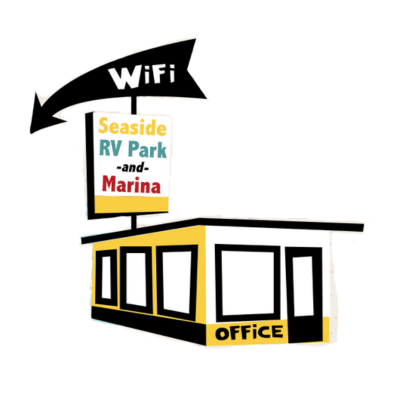
Before cellular data plans became more capable and before Starlink changed satellite internet for mobile users, borrowing bandwidth from campground or marina Wi-Fi was often an important or the only way to get online.
Wi-Fi-as-WAN still has a place, but it is less central than it used to be.
Cellular and satellite options have improved dramatically, while many campground and marina Wi-Fi networks remain constrained by the same old problems: slow backhaul, bad access point placement, captive portals, outdated equipment, and too many users sharing too little capacity.
For Wi-Fi-as-WAN, the most important bands remain 2.4 GHz and 5 GHz.
2.4 GHz can reach farther, but it is slower and congested. 5 GHz is usually the better choice when available, especially if you can get your antenna or Wi-Fi client device outside and pointed toward the source.
One important issue we focus on when advising users on Wi-Fi-as-WAN setups is whether a router uses the same radio for WAN and LAN. In single-radio designs, the same radio will have to do double duty and connect to the campground Wi-Fi as WAN and also serve your local LAN devices. This double duty carries a significant performance penalty.
This is where dedicated Wi-Fi-as-WAN hardware, outdoor antennas, outdoor CPEs, or antenna systems can make a real difference. But these are usually only worth investing in if you plan to utilize Wi-Fi-as-WAN as a major tool in your mobile internet arsenal.
As discussed above, 6 GHz has regulatory and range limits and is unlikely to matter much for Wi-Fi-as-WAN anytime soon.
For more on using Wi-Fi as an Internet source, see our guide: Using Wi-Fi as a Mobile Internet Source - Selecting Long Range Wi-Fi Extending Gear.
Wi-Fi Security
 As Wi-Fi technology advances, security standards continue to evolve as well.
For a wireless connection, security is important to prevent others from snooping on or hijacking it. We cover Wi-Fi security much more deeply in our Security guide.
But generally, when you make a Wi-Fi connection, several security protocols are available to encrypt the connection, depending on which the client and access point support.
Modern Wi-Fi gear should support the WPA2 standard at a minimum, and WPA3 is increasingly expected on newer gear. Old WEP and WPA-only devices should be avoided whenever possible.
However, security can become complicated when older and newer devices are mixed on the same Wi-Fi LAN.
Many printers, cameras, smart plugs, appliances, and other IoT devices either support older security standards or work reliably only on 2.4 GHz. Some of these devices are also not especially trustworthy from a security perspective, even if they are useful.
A good solution is to create separate SSIDs or VLANs for different types of devices to segregate them.
For example, with an appropriate router and/or access points, you might set up this configuration:
- A primary 5 GHz network for trusted computers, phones, tablets, and streaming devices.
- A 2.4 GHz-only network for IoT devices, printers, cameras, and other legacy devices.
- A 2.4/5 GHz guest network for visitors that is isolated from your main LAN.
- Another isolated or restricted network for devices that do not need access to the rest of your LAN.
A dedicated 2.4 GHz-only SSID can also make setup easier for many smart devices, since some 2.4 GHz-only devices struggle when a router uses the same network name for both 2.4 GHz and 5 GHz.
Prosumer routers, including Peplink and similar platforms, usually make it easy to create isolated SSIDs and VLANs, and some more consumer-oriented routers may support this as well. This capability can be especially useful for nomads, where a single router may be handling everything from supporting work and streaming devices to serving guests, smart-home equipment, cameras, and other gear all at once.
For router setup basics, see our Peplink Getting Started Initial Settings guide and our broader Selecting a Mobile Router guide.
FCC Router Ban and Wi-Fi Gear

One of the biggest factors currently affecting the Wi-Fi gear market is the FCC router ban.
In March 2026, the FCC updated its Covered List to include foreign-made consumer-grade routers, restricting approval of new models unless the manufacturer receives conditional approval.
This does not mean previously approved routers are suddenly illegal to use or sell. Existing approved models are not directly banned.
But new device approvals for some companies could be delayed or prevented entirely, especially for vendors that rely on foreign manufacturing, which includes essentially all of the consumer networking industry.
This could matter for mobile internet users because the transition to full-featured Wi-Fi 7 gear depends on new hardware platforms, new chipsets, and new router models, all of which must receive FCC approval before they can be legally sold in the US.
If approvals become slower, more expensive, or less predictable, the rollout of newer more fully-featured Wi-Fi 7 routers and hotspots in the US could slow down. Larger vendors may navigate the conditional approval process more easily, while smaller or niche mobile-router vendors may face greater challenges.
For now, it seems that enterprise manufacturers, such as Peplink, are exempt from the ban.
Netgear has already received conditional approval covering major consumer router lines, including mobile hotspots, but it remains to be seen how quickly other manufacturers follow and whether the process will affect product availability or timing.
This is an evolving story, so for the latest coverage and developments, see our FCC News Coverage.
Future Watch
Here's a quick rundown of things we are tracking.
Wi-Fi 8
Even though Wi-Fi 7 is still rolling out, work on Wi-Fi 8 is already underway.
But Wi-Fi 8 is not expected until later in the decade, and there is no reason for mobile internet users to wait for it.
Early indications suggest Wi-Fi 8 may focus more on reliability and efficiency. These improvements could be valuable eventually, but Wi-Fi 8 is still too far away to affect buying decisions today.
Better Wi-Fi 7 Implementation
The more important near-term development will be better Wi-Fi 7 implementation.
Over time, we expect more routers, hotspots, laptops, phones, and operating systems to improve support for 6 GHz, MLO, wider channels, and advanced Wi-Fi 7 features.
Firmware updates may also improve early Wi-Fi 7 gear. But buyers should not assume future firmware will fix every limitation. Hardware design still matters.
More Mobile 6 GHz Gear
The regulatory changes discussed earlier could eventually make 6 GHz more practical for mobile and outdoor use.
It is also likely that more mobile routers and hotspots will add 6 GHz support over time, especially as Wi-Fi 7 chipsets become more common.
Concluding Thoughts
 Mobile technology is constantly advancing, and Wi-Fi remains a key part of almost every mobile internet setup.
Even as cellular and satellite get most of the attention, Wi-Fi is still the technology that connects most of your devices to your local network and to your upstream Internet sources.
But the practical guidance for most of our audience who live, work, or travel in vans, boats, or RVs remains fairly straightforward.
- Wi-Fi 6 is our practical minimum recommendation for new mobile internet gear.
- 5 GHz remains the most important everyday Wi-Fi band.
- 2.4 GHz remains important for range and legacy devices.
- 6 GHz is useful, but primarily for short-range LAN performance.
- And Wi-Fi 7 gear should be evaluated based on actual implemented features, not just having the "Wi-Fi 7" label.
For now - do not pay a major premium for Wi-Fi 7 unless it includes features that actually work and that you will actually use.
Wi-Fi 7 will continue to improve, and future routers, hotspots, and access points will likely implement the full standard more effectively. But for now, mobile users should buy based on an evaluation of the whole product, not because it advertises the latest Wi-Fi generation.
Further Reading:
- Guide: Fundamentals of Wi-Fi Technology
- Guide: Using Wi-Fi as a Mobile Internet Source - Selecting Long Range Wi-Fi Extending Gear
- Guide: Selecting A Router For Cellular, Wi-Fi and Satellite Integration
Related News:







 Mobile Internet Resource Center was founded by Chris & Cherie of