
Key points:
- New Residential customers now pay a $10/month equipment rental fee
- Rental customers cannot place their service into Standby Mode
- There are still ways to purchase and own Starlink hardware outright
- High Demand Surcharges still apply in some areas
Starlink has made a significant change to Residential service by eliminating the option for new customers to purchase hardware outright. Instead, all new Residential customers are now provided equipment through a $10/month rental program.
While the change lowers the upfront cost of getting started with Starlink, it also means new Residential customers no longer own their hardware and cannot use features such as Standby Mode. Existing Residential customers who already own their equipment are not affected by this change.
Table of Contents
Starlink Residential Rental Fee Video Story
A Shift Away From Upfront Hardware Purchases
Just a few short years ago, when Starlink was rather new, it would cost you $500-$600 to purchase a Starlink dish before you ever started service. This was true for both Residential and Roam service and was a significant investment in a product that may or may not work due to tree coverage or other factors affecting the view of the sky. While you could return it for a full refund in the first 30 days, after that you owned the equipment regardless of whether you kept the service.
Over the years, the equipment cost has continued to drop, and most recently Starlink was offering the equipment with no monthly rental fee for Residential customers in low demand areas to attract people away from other ISP choices they may have. In higher demand areas, Starlink continued to charge for the equipment and in extreme cases charged a High Demand Surcharge of up to $1500 in addition to the equipment cost.
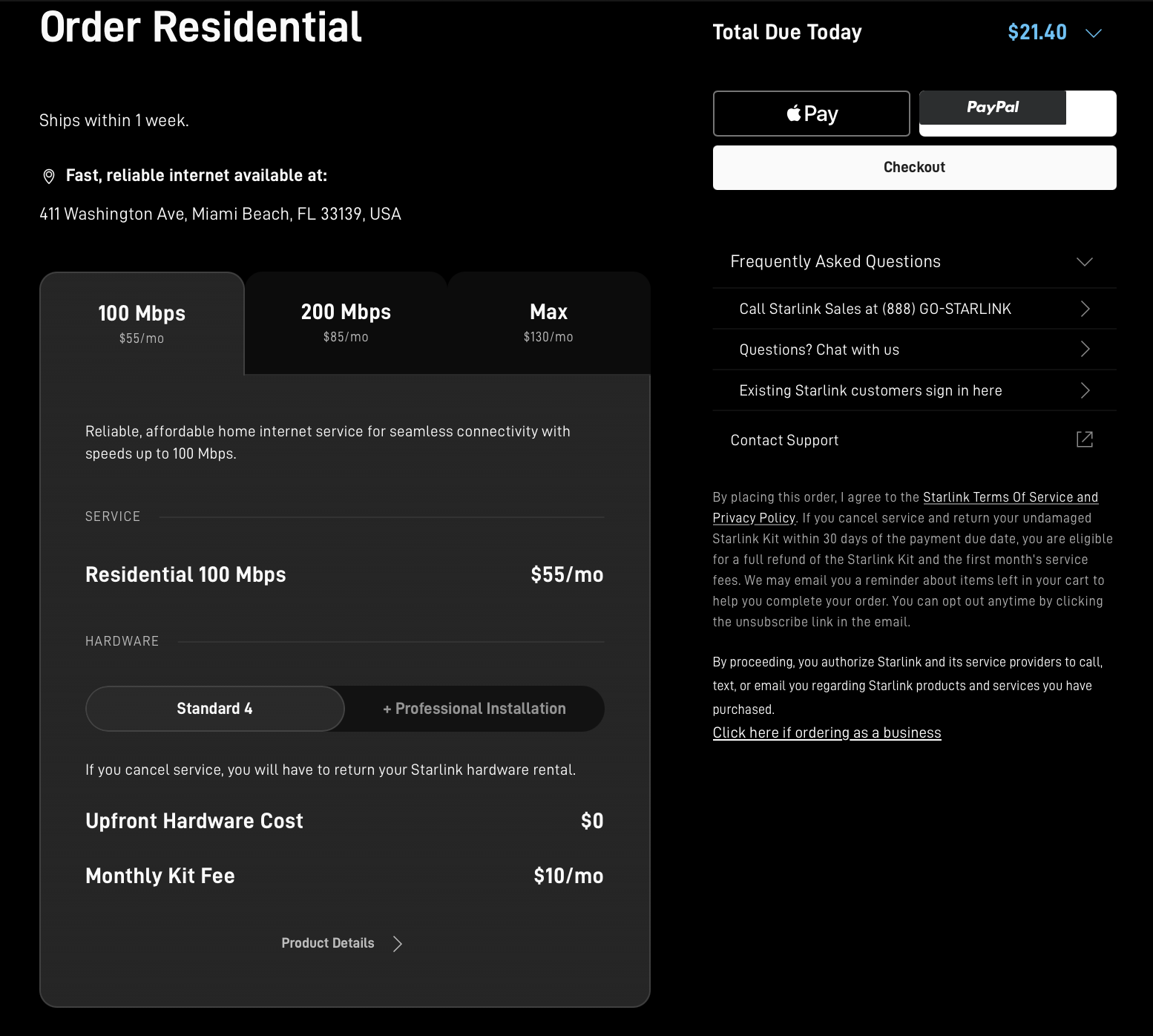
Starlink has now made a shift away from one-time equipment purchases, and all new Residential customers are now offered the equipment only through a $10 monthly rental fee. This means you no longer have to pay several hundred dollars upfront for equipment. Instead, you pay a $10/month rental fee on top of your normal service bill. However, you no longer own the equipment and Starlink has put restrictions on it – such as not being able to put your dish on standby for a period of time.
For some users, the inability to use Standby Mode may be one of the biggest drawbacks of the rental program. Standby allows customers who own their hardware to switch to a reduced-cost service option that includes unlimited low-speed connectivity when full-speed service is not needed. This can be particularly useful for seasonal users, vacation properties, security cameras, remote monitoring systems, or anyone who only needs Starlink part of the year.
How To Still Own Your Starlink Equipment
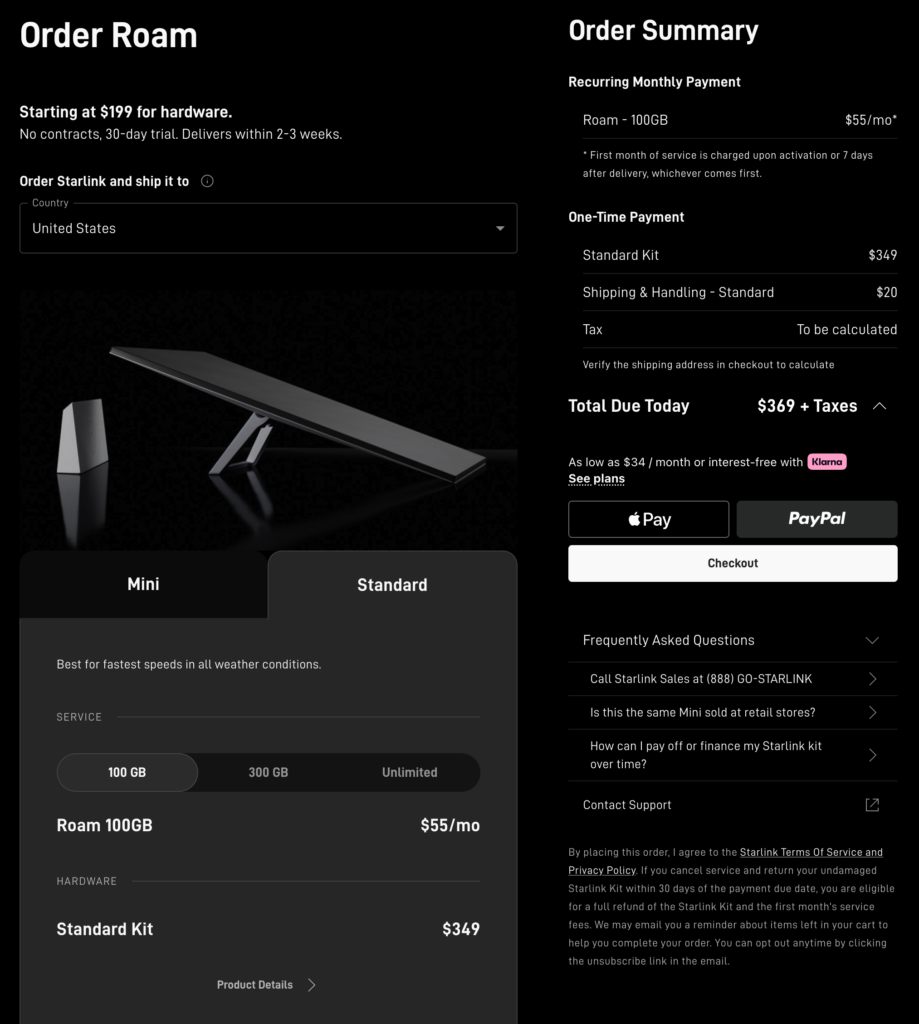
Some people may appreciate not having to put down a few hundred dollars on equipment when purchasing Starlink service, but others may wish to own their equipment outright so they have greater flexibility, including using Standby Mode or canceling and reactivating service when they need it.
Owning the hardware also means you are not required to return equipment if you decide to discontinue service in the future.
If you would prefer to own your hardware and plan to purchase direct from Starlink, you will have to start with a Roam plan, then switch to a Residential plan once service is established.
Another option is to purchase the dish outright through a 3rd party retailer such as Home Depot or Best Buy. Customers who purchase hardware through a retailer can activate it directly on a Residential plan without first subscribing to Roam service.
Note: In many places in the US, the Starlink Mini cannot subscribe to residential service, so this generally only works with the Standard Dish.
Finally, Starlink says that if you are a current rental customer and would rather purchase the dish outright, you can open a support ticket and request to purchase the equipment you are renting.
If you fail to return the Starlink dish after canceling service while renting, Starlink will also charge you the full price of the equipment and ownership transfers to you at that point.
High Demand Surcharges Still Exist With the Rental Option
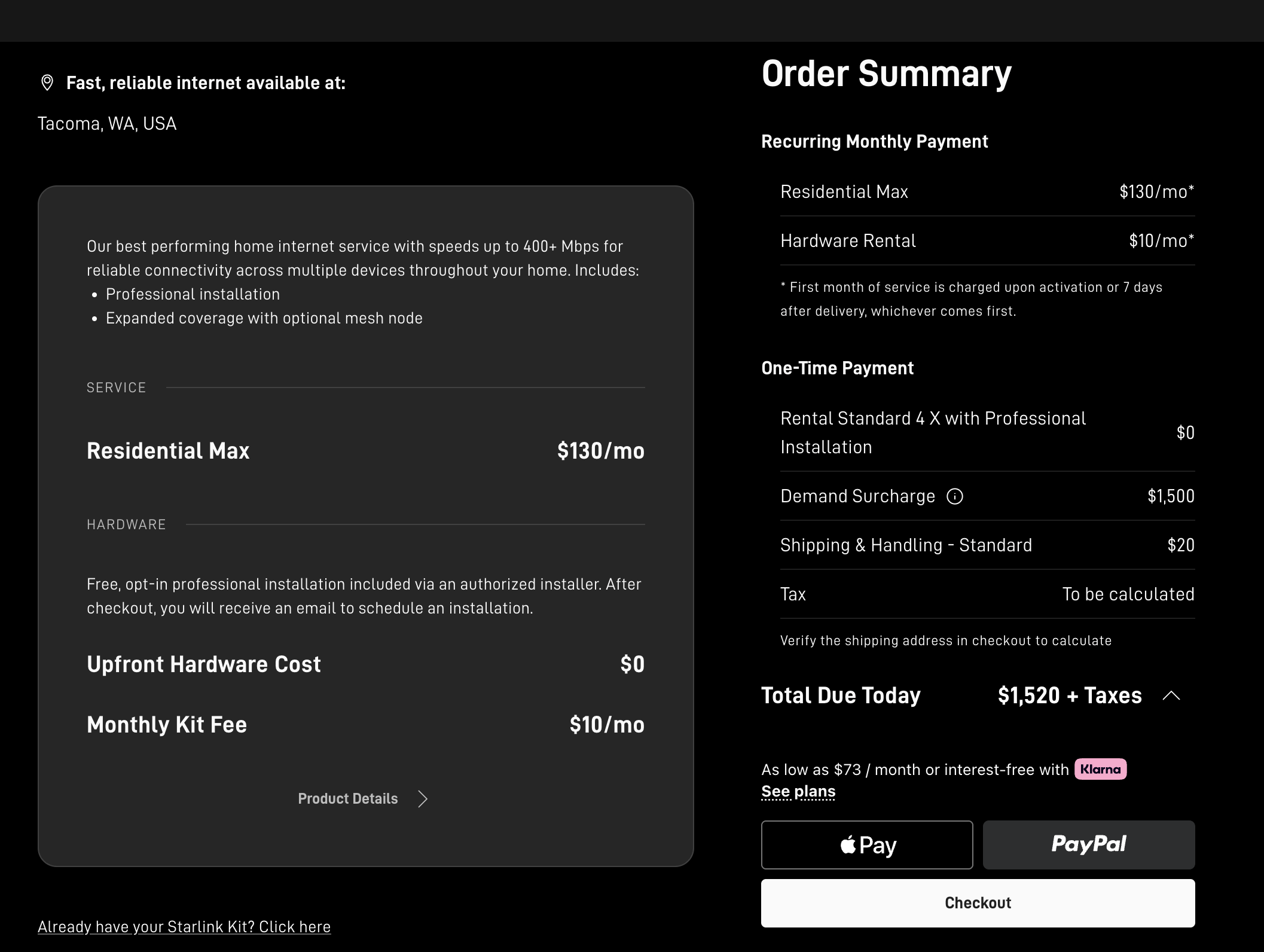 While Starlink is now offering the $10/month rental option in high demand markets, you can still be charged an additional High Demand Surcharge in certain regions, most notably the Pacific Northwest. You also will likely only be offered the most expensive Residential Max plan at $130/month in these regions.
Searching a few addresses, the High Demand Surcharge is $1500 in the Tacoma, WA area but drops to $500 in the Seattle, WA area. Portland, OR currently has no High Demand Surcharge. While the High Demand Surcharge is just a one-time fee, it can be quite a significant cost in some areas and is aimed to discourage users from signing up that have other options.
Concluding Thoughts
The Starlink rental option currently only affects new Residential customers, and new Roam users are not impacted by the inability to purchase equipment directly. However, for new customers who want residential service but need account flexibility (eg nomads, snowbirds, part-time at a cabin), owning the equipment may be preferable since it allows them to use features such as Standby Mode or canceling and later reactivating service without needing to return rented hardware.

Learn More:
Starlink's Referral FAQ.
Use our referral link when purchasing equipment from Starlink.com and activating a consumer Residential or Roam data plan - and get a FREE month of service!
Someone on our team will also get a service credit, which helps us keep our multiple lines of service active for continued testing.
It's a win-win - you save money and help support MIRC!
Further Reading
- Starlink Satellite Internet For Mobile RV And Boat Use - Our featured guide focused on taking advantage of SpaceX's Starlink on the go.
- Mobile Satellite Internet Options -
 Our featured guide on all the current and future satellite internet options of interest to RVers and cruisers.
 - All our Satellite Internet Resources - Our collection of guides, gear center entries, and news coverage on satellite internet.
- Industry Update: Mobile Satellite Internet for RVers & Boaters - Our deep dive into the current state of the satellite internet world.
And here is all of our recent satellite internet coverage:




 Mobile Internet Resource Center was founded by Chris & Cherie of