
Starlink recently updated its firmware and app to give some new Wi-Fi options. Specifically, Starlink's Wi-Fi can be configured to use one of three "network modes."
- Default
- Guest
- Auto
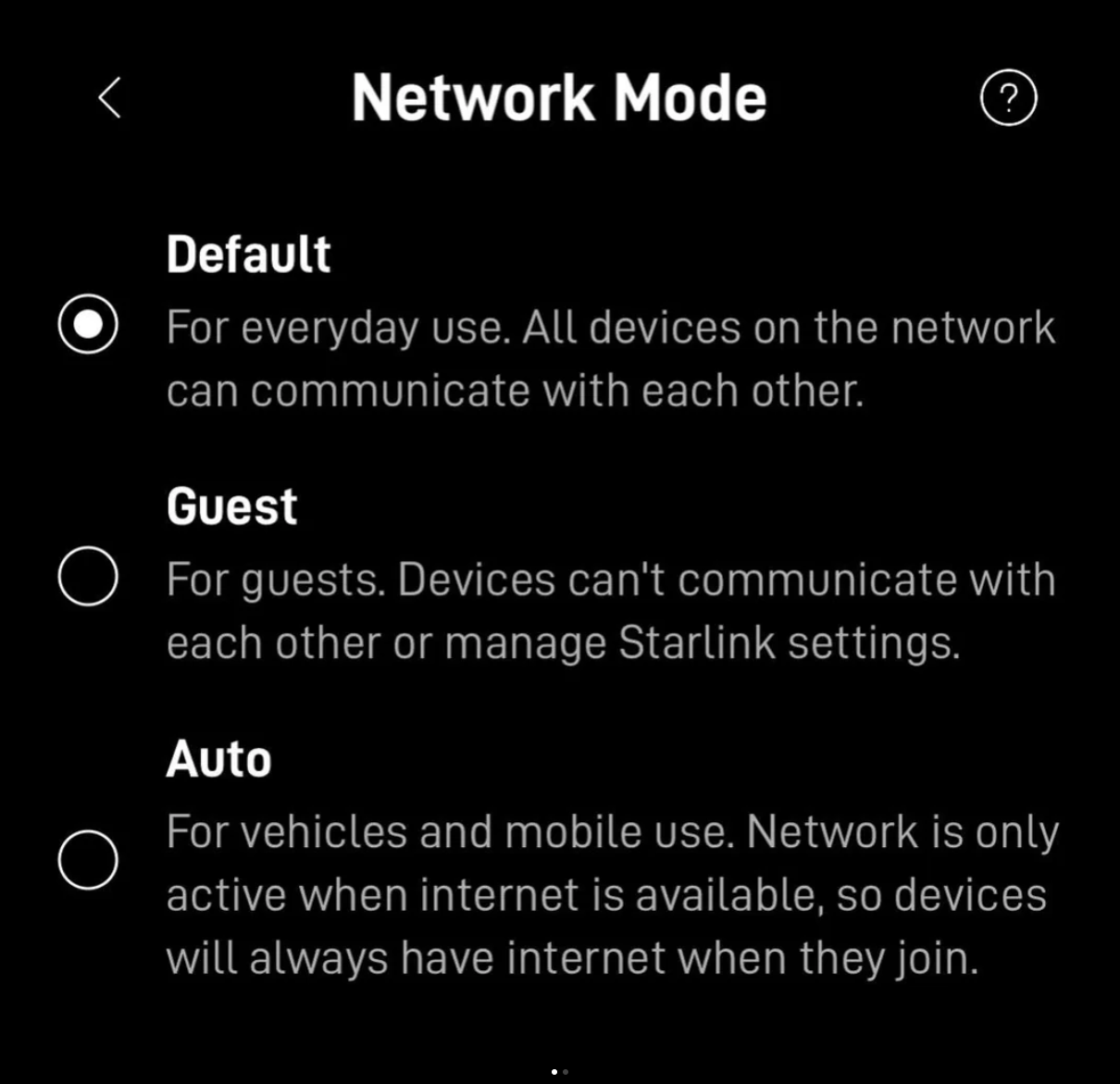 The default mode is just that - Starlink's default Wi-Fi settings. Starlink requires at least one Wi-Fi network configured in default mode.
Guest mode has long been a Starlink feature, but it's now been moved to this new menu. Guest mode prevents devices connected to the Wi-Fi network from communicating with each other.
The new addition is "Auto" mode. This is specifically designed for vehicles and in-motion use, but can have other applications. The Starlink Help article describes it this way:
Designed for vehicles and mobile installations like boats, RVs, and cars. In Auto mode, the WiFi won’t turn on until Starlink has established an internet connection — so by the time your devices connect to the network, they’ll have internet access right away.
If the internet connection drops for more than a minute, the WiFi will turn off automatically and come back on once the connection is restored. This prevents your phone or laptop from staying connected to a WiFi network that has no internet, which is especially useful when your devices roam between cellular and WiFi as the dish is booting up.
To use this feature, you need to create a second Wi-Fi network on the Starlink router, since the system requires at least one default mode Wi-Fi network. In the updated app, once you create a new Wi-Fi network name and password, you'll have the option to designate the network mode.
The system does take about 1-2 minutes to detect either a connection drop or the reestablishment of the connection, so the Wi-Fi in auto mode will adjust as conditions change, but not quickly.
Of course, many in our audience use Starlink as one of several WANs and have already set up failover or bonding solutions to account for Starlink drops and disconnects. For users who use Peplink's SpeedFusion with multiple WANs, for example, the new mode doesn't help, but it can be useful for those who connect their devices directly to the Starlink via Wi-Fi.
Key Mobile Internet Related Considerations:
- Starlink routers now have three Wi-Fi modes - Default, Guest, and Auto.
- The Auto mode turns the Wi-Fi network on only when the dish has an internet connection.
- Using Auto mode requires creating a second Wi-Fi network on the Starlink router.

Learn More:
Starlink's Referral FAQ.
Use our referral link when purchasing equipment from Starlink.com and activating a consumer Residential or Roam Unlimited data plan - and get a FREE month of service!
And so will someone on our team, which helps us keep our multiple lines of service active for continued testing.
It's a win-win - you save money and help support MIRC!
Video Story:
Coming Soon
Related Content at the Mobile Internet Resource Center:
- Guide: Starlink Satellite Internet For Mobile RV And Boat Use
- Starlink Resources: Starlink Resource Collection
- Content Collection: Mobile Satellite Internet Resources
- Gear: SpaceX Starlink
Related Updates:




 Mobile Internet Resource Center (dba Two Steps Beyond LLC) is founded by Chris & Cherie of